

Redmine Issue Merge
Redmine Issue Merge
Merge a duplicate issue into an existing one. Built for the dispatch workflow where an incoming mail without [#issue-number] in the subject spawns a second issue about the same topic.
This software can be used without costs. Therefore you get some cool stuff, at your own risk and maybe including some bugs. However, the intention is to solve you a problem or issue.
Have fun and hopefully this piece of code helps you.
I would be very thankful if you support me doing this, buying me a coffee!
What it does
When merging a source issue → target issue:
- One journal entry is added to the target issue containing the source
description and (optionally) all of the source’s notes. The first line is a
freely editable header (default from the settings, e.g.
Eintrag/Merge aus Duplikat #123). The entry is rendered inside a configurable CSS box. - Attachments are moved from the duplicate to the target issue (only the database foreign key changes; the files on disk stay untouched).
- A “duplicates” relation is created between the duplicate and the target.
- The duplicate is closed (not deleted) and gets a back-reference note, so you can always look it up later.
No schema migration, no manual SQL, no changes to Redmine core files. Only the regular models are used.
Installation (Docker volume mount)
Mount/copy the redmine_issue_merge folder into plugins/, then:
docker compose exec redmine bundle exec rake redmine:plugins:migrate RAILS_ENV=production
docker compose restart redmine
There is no migration; the migrate task is convention only and does no harm.
The restart is what actually loads the plugin code. No bundle install is
required (no extra gems).
Configuration
After the restart, set up two things:
1. Permission under Administration → Roles and permissions: grant the “Merge issues” permission to the roles that are allowed to merge. Without it the action link does not appear.
2. Plugin settings under Administration → Plugins → Configure (for the “Redmine Issue Merge” plugin):
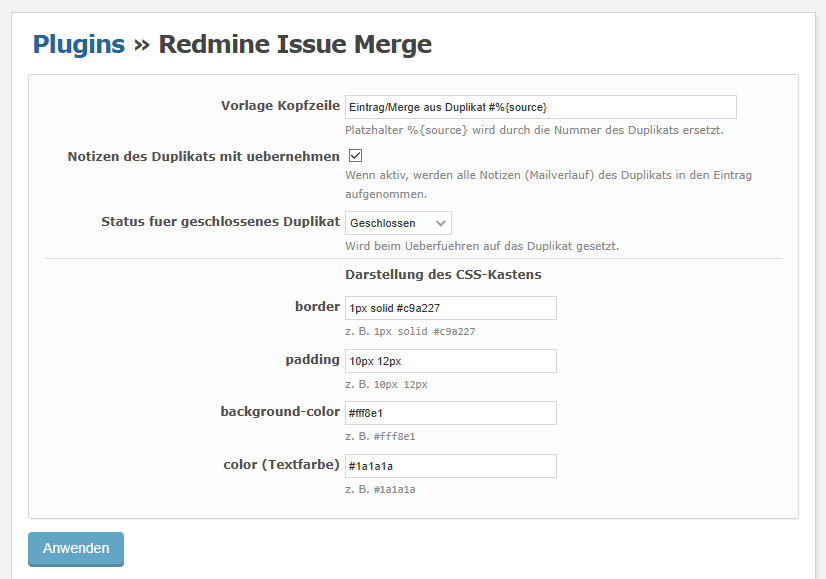
Redmine Plugin Configuration (German View)
| Setting | Meaning |
|---|---|
| Header template | Default text of the merge entry’s first line. The %{source} placeholder is replaced by the duplicate’s number. Still editable in the merge form. |
| Include duplicate’s notes | If enabled, all notes (mail history) of the duplicate are included in the entry. If disabled, only the description is copied. |
| Status for closed duplicate | Status applied to the duplicate when merging (only closed statuses are listed). Tip: create a dedicated closed status such as “Duplicate”. |
| border | CSS border of the box, e.g. 1px solid #c9a227. |
| padding | CSS padding, e.g. 10px 12px. |
| background-color | Background colour, e.g. #fff8e1. |
| color | Text colour, e.g. #1a1a1a. |
Usage
On the duplicate’s issue page, open the “Merge into another issue” link
in the action bar (.contextual, both the top and bottom bars, placed before
the “More” menu). Enter the target issue number, adjust the header if needed,
and submit. The duplicate is closed and its content ends up in the target
issue.
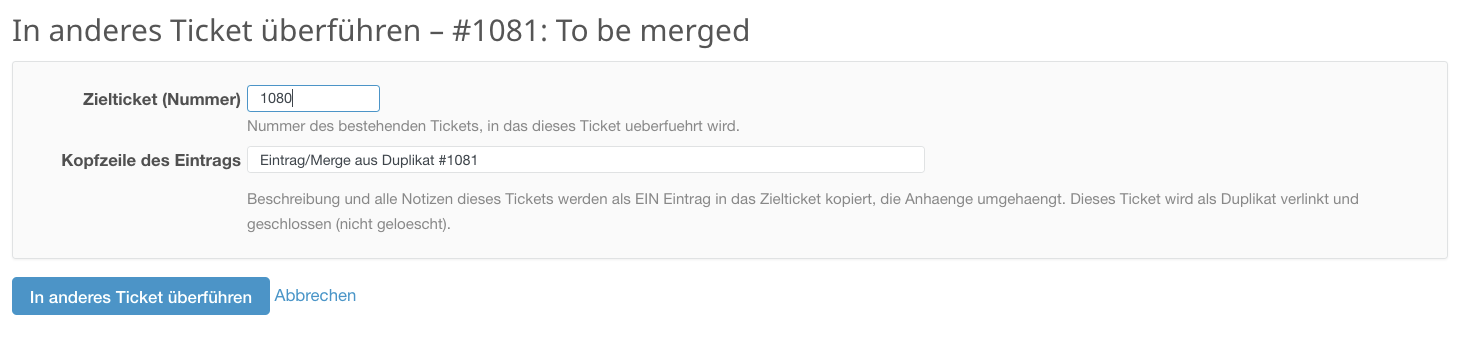
Issue merge dialog (German View)
How the CSS box works
Redmine sanitizes every journal note on display; inline HTML with style would
be stripped. The plugin solves this via JavaScript: a small script is injected
into the page head (hook view_layouts_base_html_head), finds the note by an
invisible marker (%%MERGE%%) at its start, removes the marker and adds the
class redmine-merge-box to the note container. The matching CSS
(border/padding/background-color/color from the settings) is emitted from the
same hook. This approach is independent of whichever internal render path
Redmine uses for the note (which changed several times in 6.1).
The action link is likewise injected into every .contextual bar via
JavaScript (before span.drdn). Its icon uses Redmine’s sprite_icon
(inline SVG) so it looks like the other action links.
Notes / limitations
- As of v1.3.0, edit permission (
edit_issues) is required on both projects – the duplicate’s and the target’s. Private notes of the duplicate are deliberately not copied. - Mail histories are copied verbatim as text (no date sorting, by design). Order is chronological by creation time.
- Images referenced inline by filename keep working after the move, because the attachments now belong to the target issue.
- The merge runs inside a transaction: if any step fails (e.g. a required field on close), nothing is changed.
- Closing the duplicate respects your workflow’s required fields. If your workflow enforces fields on close, the merge may fail there – relax the required fields or pick an appropriate status.
- The box rendering and the contextual link require JavaScript to be enabled. The actual merge (data transfer) is entirely server-side.
Uninstall
Remove the plugin folder and restart Redmine. As there is no migration, no DB
steps are needed. Existing merges remain intact; the invisible %%MERGE%%
marker will then no longer be removed and shows up as a text line at the start
of the affected note.
Versioning
v1.3.1 - New MERGE indicator: U+2063 INVISIBLE SEPARATOR. The former
%%MERGE%% was ignored by Textile, as % is used by it. So this new one makes
the plugin useable/work with Textile not only CommonMark