

Ticket Reply per Mail
Redmine Ticket Reply
This Redmine plugin allows to send emails to freely chosen recipients (To/CC/BCC) straight from a Redmine ticket
- Separate templates for internal and external recipients
- Set signature for each user
- Sent mail is logged as a note to the tickets journal
- Attach current ticket history as plain text
- Close ticket after mail sent
This software can be used without costs. Therefore you get some cool stuff, at your own risk and maybe including some bugs. However, the intention is to solve you a problem or issue.
Have fun and hopefully this piece of code helps you.
I would be very thankful if you support me doing this, buying me a coffee!
The following instructions are for using the plugin in a docker container with volumes set up.
How it works
- “Reply by email” button on the ticket page (above and below the details).
- Compose form with To / CC / BCC, subject, text, template selection and a picker for existing ticket attachments.
- The template is preselected automatically: if all recipients belong to the internal domain → “Internal”, otherwise → “External”. Can be overridden manually.
- Delivery uses the SMTP connection configured in
config/configuration.yml(the same one Redmine uses for its regular mails). - From/Reply-To come from the plugin settings (default: the global Redmine sender address).
- Recipient replies are routed back to the ticket via the
#IDin the subject (standard Redmine mail handler).
Requirements
A working outgoing mailer must be configured in Redmine before this plugin can send anything. The plugin uses Redmine’s own mail delivery
(config/configuration.yml → email_delivery / SMTP). If Redmine cannot send mail (e.g. no SMTP host configured, relay not reachable), the reply will fail.
Verify this first under Administration → Settings → Email notifications → “Send a test email” – only once that test mail arrives will this plugin work.
Installation
- Put the folder into
plugins/redmine_ticket_reply(inside the mountedredmine_pluginsvolume).
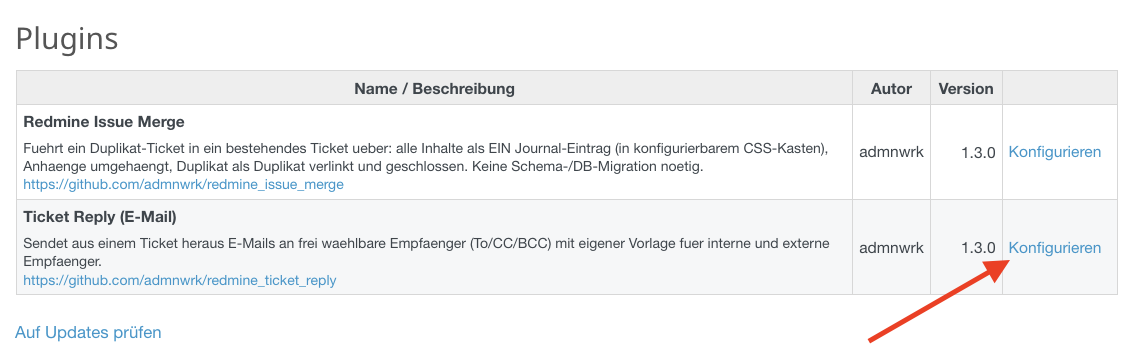
Redmine Plugin Page (German View)
- Restart Redmine. A DB migration is required for this version (it creates the
ticket_reply_contactstable)
docker exec redmine-containername bash \
  -lc 'cd /usr/src/redmine && \
  RAILS_ENV=production bin/rails redmine:plugins:migrate'
docker compose restart redmine
- Administration → Plugins → Configure:
- Sender address (From):
sender@mail-address.com - Reply-To:
reply@mail-address.com(the mailbox fetched via IMAP) - Internal domain:
mail-address.com(users in the system) - Reply separator line: e.g.
----- Please reply above this line -----
- Sender address (From):
- Project → Settings → Modules: enable “Ticket reply (email)”.
- Administration → Roles and permissions: grant the desired role the permission “Send ticket reply by email”.
- Administration → Settings → Incoming emails → “Truncate emails after one of these lines”: enter the same separator line, so quoted histories are cut off on incoming replies.
- Recommendation for single-mailbox operation: set the Redmine emission address
(Administration → Settings → Email notifications) to
sender@mail-address.comas well, and point the IMAP fetch (fetchMails.sh) atsender@.
FetchMail
Not part of the plugin, but redommended is a setup infrastructure receiving mails from an IMAP mailbox. The from, cc field is read and addresses are stored in a new table, like described above. Those addresses are automatically filled out once you want to reply.
Customizing
- Templates:
app/views/ticket_reply_mailer/{external,internal}_reply.{text,html}.erb - The entered text is rendered like a ticket comment (Markdown/Textile according to the Redmine text formatting setting); the HTML part contains the formatted version, the text part the markup source.
Canned responses (templates)
Canned responses are plain files (.txt or .md). Each file = one entry in the “Canned response” dropdown in the reply form. Selecting one prefills subject and text (freely editable afterwards).
File format:
Subject: [Acknowledgement] {{subject}}

Hello,

thank you for your message (ticket #{{id}}) ...

Kind regards
{{agent}}
- The first line
Betreff:(orSubject:) is optional and sets the subject. - The rest is the body.
- The file name determines order and label:
01_acknowledgement.md→ label “acknowledgement” (leading digits +_are stripped,_becomes a space).
Where do the templates live? Two options
A) In the plugin folder (simplest). Store them under canned/ in the plugin. Since your plugins folder is mounted as a volume anyway, you edit the files directly on the host:
./redmine_plugins/redmine_ticket_reply/canned/05_my_template.md
Downside: they can be lost on a plugin update/overwrite.
B) Own volume (recommended for your own templates). Place the templates outside the plugin and mount them. In docker-compose.yml on the redmine service:
    volumes:
      # ... existing mounts ...
      - ./redmine_templates:/redmine_templates
Then configure under Administration → Plugins → “Ticket Reply (E-Mail)”:
“Templates directory” = /redmine_templates. The files now live on the host under ./redmine_templates/*.md and survive plugin updates.
Putting it into operation
- Add/change a template: create/edit a file – no restart needed, the templates are read fresh every time the form is opened. (With option B and a new volume, run
docker compose up -donce to mount it.) - Change ERB templates (
app/views/ticket_reply_mailer/*.erb, i.e. the wrapper with greeting frame/footer): these are cached in production, so restart the container afterwards:docker compose restart redmine.
Available placeholders (variables)
Usable in canned responses, subject and signature. Replaced when the form is opened, for the given ticket / logged-in agent:
| Placeholder | Content |
|---|---|
{{id}} |
Ticket number |
{{subject}} |
Ticket subject |
{{status}} |
Status |
{{author}} |
Reporter name |
{{author_firstname}} |
Reporter first name |
{{assignee}} |
Assignee name |
{{agent}} |
First name of the logged-in agent |
{{agent_name}} |
Full name of the logged-in agent |
{{signature}} |
Signature of the logged-in agent |
Signatures (per user)
Each agent maintains their own signature in their Redmine profile:
- Administration → Custom fields → Users → New field: format “Long text”, name e.g.
E-Mail-Signatur. Make it visible/editable for the roles. - The field name must match the plugin setting “Signature field (user)” (default:
E-Mail-Signatur). - Each agent enters their signature under “My account”.
Behaviour:
- If “Append signature automatically” is on (default), the logged-in agent’s signature is appended to the end of the mail – unless the text already contains it (e.g. because a canned response uses
{{signature}}). This avoids a duplicate signature. - With
{{signature}}you place the signature at a specific spot in a canned response yourself. - If an agent has no own signature, the “Default signature” from the plugin settings applies (if set).
Signatures and canned responses need no restart – they are read fresh every time the form is opened.
Closing the ticket on send
The reply form has a checkbox “Close the ticket after sending”. Flow: the mail is sent first, then the status is set to a closed status.
- Which status: plugin setting “Status when closing” (name). Empty = first closed status allowed by the workflow.
- Dependencies are handled: if the ticket cannot be closed (e.g. because it is blocked by another open ticket, has open subtasks, or the workflow does not allow the transition), the note is kept, the ticket stays open, and a warning with the concrete reason is shown in the form. The mail is out in any case.
Editor (formatting) and preview
The text field uses the normal Redmine wiki toolbar (bold, italic, strikethrough, lists, links, code …) – depending on the configured text formatting (Markdown/Textile). Underline is not available in Markdown and is therefore not in the toolbar.
Use the “Edit” / “Preview” tabs to see the rendered result. In the email the text is rendered exactly like a ticket comment: the HTML part contains the formatted version, the text part the markup source.
Versions
- 1.5.0 - Added possibility to “send as…” (if supported by mailserver/-relay)
- 1.4.0 - Enhanced options while sending mails
- 1.3.1 - Adds a configurable number of journal entries as reference below the mail form
- 1.3.0 – Security hardening: ticket visibility is enforced
(
@issue.visible?), all recipient addresses are validated (format + control characters), CR/LF is stripped from the subject, and error messages no longer expose internal details to the user (server log only). EnglishREADME.mdadded, German file asREADME_de.md. - 1.2.x – Interim releases (To/CC/BCC polish, minor fixes); not documented individually.
- 1.1.3 – Captured addresses additionally shown as a visible server-rendered box (theme-independent); JS moves them next to the author line and hides the box on success.
- 1.1.2 – Fix: the MailHandler patch is now applied directly on plugin load
(the earlier
config.to_preparedid not fire in production, because Redmine loads plugins within ato_preparerun already). - 1.1.1 – Captured sender + further recipients are shown directly at the ticket’s author line (via view hook + JS, no migration).
- 1.1.0 – Address capture of anonymous mails (From/To/Cc) for To/CC prefill and reply-all; display of the last sender on the ticket; MailHandler patch.
- 1.0.0 – Editor toolbar + preview, ticket closing on send (with dependency handling), per-user signatures, canned responses, history attachment.
Sender/recipients of anonymous mails (address capture)
With unknown_user=accept the author of anonymous mails is the Anonymous user (without a mail address). To still be able to reply, the plugin captures From, To and Cc of every incoming mail on IMAP receipt and stores them per ticket (table ticket_reply_contacts) – refreshed on every follow-up mail, i.e. always the addresses of the most recent incoming mail.
In the reply form this becomes:
- To = last sender,
- CC = remaining recipients of the last mail (To + Cc), without your own mailboxes (reply-all).
Own mailboxes/aliases to be removed from the CC are entered in the plugin setting “Own mailboxes/aliases” (From/Reply-To/global sender address are included automatically). The last sender is additionally shown on the ticket.
Note: capture applies to mails arriving after installing this version. For old tickets the field is empty once and gets filled on the next incoming mail.
The MailHandler patch and Redmine updates
Address capture hooks into two methods of Redmine’s MailHandler:
receive_issue (new ticket from mail) and receive_issue_reply (follow-up).
Technique: no Redmine core file is modified. The patch is a Module#prepend
(file lib/redmine_ticket_reply/mail_handler_patch.rb) that is activated on
plugin load (direct prepend) and calls the original method via super.
Implications for a Redmine update:
- No merge conflicts: since no core files are touched, the patch survives a Redmine update unchanged – it is reactivated automatically at startup.
- Only coupling: the method names
receive_issue/receive_issue_reply. These have been stable in Redmine for many versions. - Robust against removal: should a future Redmine version rename or remove these methods, address capture fails silently – no crash, since the call then bypasses our wrapper. Replying still works (you may have to enter the address manually), only the automatic prefill would be missing.
Check after a Redmine upgrade: send a test mail to the system and check on the
ticket whether “Last email sender” gets filled (or look for
[TicketReply] ContactCapture in production.log). If nothing appears, only the
two method names in mail_handler_patch.rb need to be adapted to the new Redmine
version – a one-line change per method.
Note: the remaining building blocks (mailer, controller, views, canned responses, signatures, closing logic) use only public Redmine/Rails APIs and are practically unaffected by Redmine updates. The MailHandler patch is the only place that hooks into Redmine internals.